
The Sebel Preferential Code
Looking for a The Sebel preferential code? A preferential code is the code you enter in the "Preferential code" field when you book a The Sebel hotel directly on ALL.com (all.accor.com), the booking platform of the Accor group. Here is how it works, how to pay less at The Sebel and which travel promo codes work in 2026.
Brand: The Sebel: Stylish apartment hotels for longer stays
Group: Accor (ALL – Accor Live Limitless)
Segment: premium (upscale)
Size: about 35 properties
Known for: Apartment-style rooms, Longer stays, Australia and New Zealand
Ideal for: extended stays and family trips
Accor hotels & Trip.com promo codes
Why Trip.com? Accor (ALL - Accor Live Limitless) offers very few promo codes on its own website. We tested Trip.com, and here is what really works:
- Accor hotels (Sofitel, Pullman, Novotel, Mercure, Ibis...): Trip.com promo codes are not accepted on these hotels. But with a free Trip.com account you often get an automatic member discount, with no code needed.
- Other hotels: the Trip.com hotel code gives up to £50 off on thousands of hotels. On Trip.com, click "Use your promo code" then "Use now" to show only the eligible hotels.
Important: you must create a free Trip.com account (or sign in) to get these discounts. Codes and member prices are not applied to guest bookings.
- Click on "Copy code & get deal": the code is revealed and copied.
- Create your free Trip.com account or sign in.
- Search for your hotel and choose your room.
- Paste the promo code on the payment page.
Accor hotel: £18.46 member discount
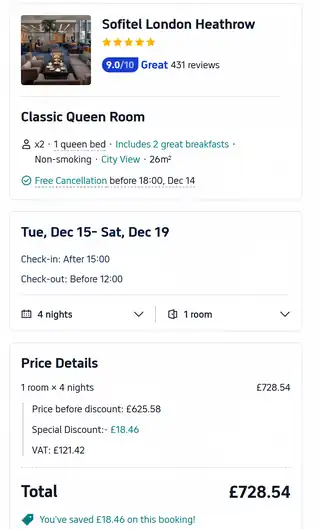
Sofitel London Heathrow, 4 nights (15 to 19 December): £18.46 "Special Discount" applied automatically with a Trip.com account.
Promo code: £50 off
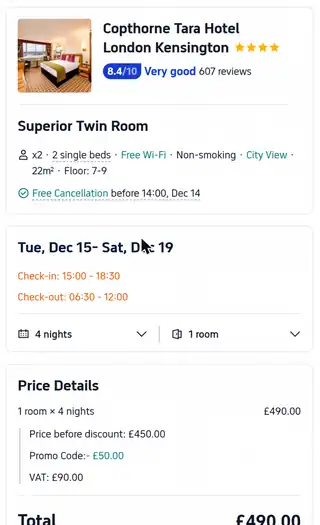
Copthorne Tara Hotel London Kensington, 4 nights (15 to 19 December): £50 off with the hotel promo code, £490 instead of £540.
Up to £50 off
Up to £50 off hotel bookings on Trip.com (not valid on Accor hotels)
Up to £20 off
Up to £20 off flights on Trip.com
10% off
10% off car rentals
8% off
8% off car rentals
5% off
5% off airport transfers
5% off
5% off UK train & coach and EU trains for new users
2% off
2% off train & coach for all users
2% off
UK and Europe trains & UK buses
6% off
6% off attractions & tours
5% off
5% off tours
10% off
10% off eSIM
The Sebel deals and member offers
5% off by becoming a member for free
Join ALL – Accor Live Limitless for free to access the member rate at participating The Sebel hotels and earn Reward points on every eligible stay.
Book in advance and save
Advance purchase rates are usually the cheapest way to stay at The Sebel if your dates are fixed.
Register to receive special offers
Create your free account to receive Accor promotions, flash sales and preferential codes by email.
What is a The Sebel preferential code?
On Accor websites, the "preferential code" field is used for promotional codes, corporate codes and partner codes. A The Sebel preferential code can therefore be a temporary promo code from an Accor campaign, a negotiated rate code from your employer (customer code and access code) or a code from a partner organisation. The code unlocks a specific rate that is not shown to the general public.
How to use a The Sebel preferential code
- Go to all.accor.com or open the ALL – Accor app.
- Enter your destination (or the name of the The Sebel hotel) and your dates.
- Open the "Preferential code" field and type your code exactly as provided (it can be case-sensitive).
- Confirm, run the search and choose the rate marked with your code.
- Sign in to your ALL account to also collect Reward points on eligible rates.
How to pay less at The Sebel without a code
- ALL member rate: membership is free and gives access to member prices at participating hotels.
- ALL Accor+: a paid subscription with its own preferential rates (not combinable with the member rate).
- Corporate rate: if your company has an Accor agreement, ask for its customer code and access code.
- Advance purchase: non-refundable rates booked early are often the cheapest.
- Book direct: codes and member rates do not work on Booking.com or Expedia.
About The Sebel
The Sebel offers upscale, apartment-style hotels in Australia and New Zealand. Spacious apartments with kitchens make it well suited to longer stays, families and business travellers.
The Sebel is one of the premium (upscale) brands of Accor and is ideal for extended stays and family trips.
The Sebel preferential code: FAQ
Is there a public The Sebel preferential code?
Accor rarely publishes public preferential codes for The Sebel. Most preferential codes are corporate or partner codes given by an employer or an organisation. The easiest ways to pay less are the free ALL – Accor Live Limitless member rate, the ALL Accor+ subscription and the time-limited offers listed on this page.
Where do I enter a The Sebel preferential code?
On all.accor.com or in the ALL app: enter your destination and dates, then open the "Preferential code" field (sometimes called "Other special rates and promo code"), type the code exactly as provided and confirm before searching. The discount appears in the price summary.
Can I use a Trip.com promo code at The Sebel?
In our tests, Trip.com hotel promo codes were not accepted on Accor hotels. However, a free Trip.com account can still unlock an automatic member price on some Accor hotels, and Trip.com codes work on thousands of other hotels.
Does a The Sebel preferential code work on Booking.com or Expedia?
No. Preferential codes and ALL member rates only work when you book directly with Accor: on all.accor.com, in the ALL app, through an Accor reservation centre or with the hotel.
Do I earn ALL points when I use a The Sebel preferential code?
In most cases yes, as long as the booking is made directly with Accor and the rate is eligible for points. Always check the rate conditions before confirming your booking.